
Case study · WordPress rebuild · Dental · UK
From Elementor to editable: a dental website rebuilt one to one.
Editing was a pain, Elementor broke regularly, and the backend crawled. The practice didn’t need a new website. It needed the same one, built properly.
95
Mobile PageSpeed (was 37)
98
Desktop PageSpeed (was 52)
6
Active plugins (was 23)
| Client | UK dental practice |
| Platform | WordPress (Elementor) → WordPress (native blocks) |
| The job | One-to-one rebuild: same layout, same features |
| Live | 16 October 2026 |
| Before | 23 active plugins, Elementor and its add-ons |
| After | 6 active plugins in total, no caching plugin needed. Every page editable in WordPress itself |
| The honest bit | Lab scores from PageSpeed Insights, not real-user data |
The starting point
Nothing was broken in a way visitors would report. It was just heavy, everywhere:
- Editing was a pain. Every change meant waiting for Elementor’s editor to load, and hoping the layout survived the save.
- Elementor broke regularly. Updates to the builder, its add-ons or the theme’s companion plugin would knock sections out of place.
- The backend was super slow. 23 active plugins all loading in the admin, on every screen.
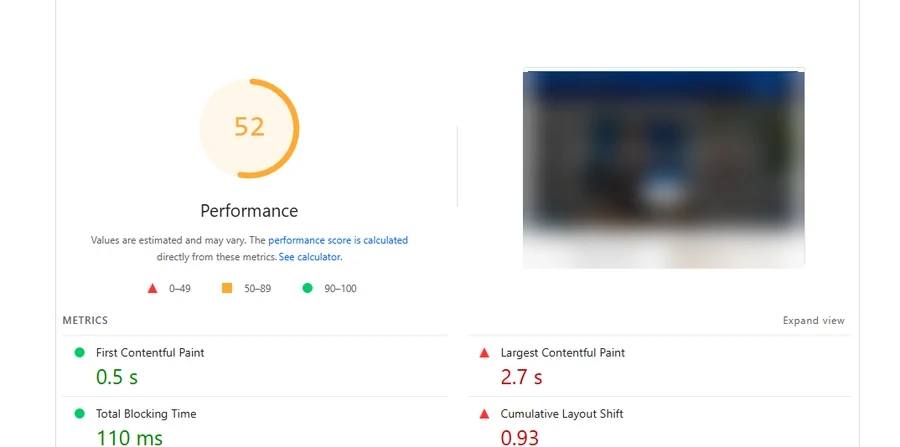
- The front end shifted while loading. Desktop cumulative layout shift was 0.93, more than nine times Google’s 0.1 limit for “good”.
What was rebuilt
A one-to-one rebuild in native WordPress blocks. Every page, every section, every feature, recreated without a page builder.
- Completely removed: Elementor, Essentials, Ocean Extra, Site Kit and Smart Slider Pro, among others.
- 6 active plugins, and that’s all of them. No caching plugin. The speed comes from the build, not from a cache layer on top.
- Fully editable. The practice, me, or any other developer can edit any page without a builder getting in the way.
Structured data, page by page
This is where a dental site can say a lot more than it usually does:
| Type | Where |
|---|---|
| Dentist | Name, address, geo coordinates, phone, opening hours, aggregate rating and the cities served |
| MedicalProcedure | 14 treatment pages |
| TherapeuticProcedure | 8 pages |
| PreventativeProcedure | The hygienist page |
| Service | 5 pages |
| OfferCatalog | Offers with UnitPriceSpecification for prices |
| FAQPage | 4 pages, 19 questions and answers |
| Person | 3 dentists, with EducationalOrganization for qualifications and PropertyValue for GDC numbers |
| MedicalWebPage | Treatment pages |
| WebPage, AboutPage, ContactPage | General pages, About and Team, Contact |
| WebSite | With a site search action |
| BreadcrumbList, Organization, Place | Breadcrumbs, publisher and brand references, locations served |
The numbers
| PageSpeed Insights (lab) | Before | After |
|---|---|---|
| Mobile | 37 | 95 |
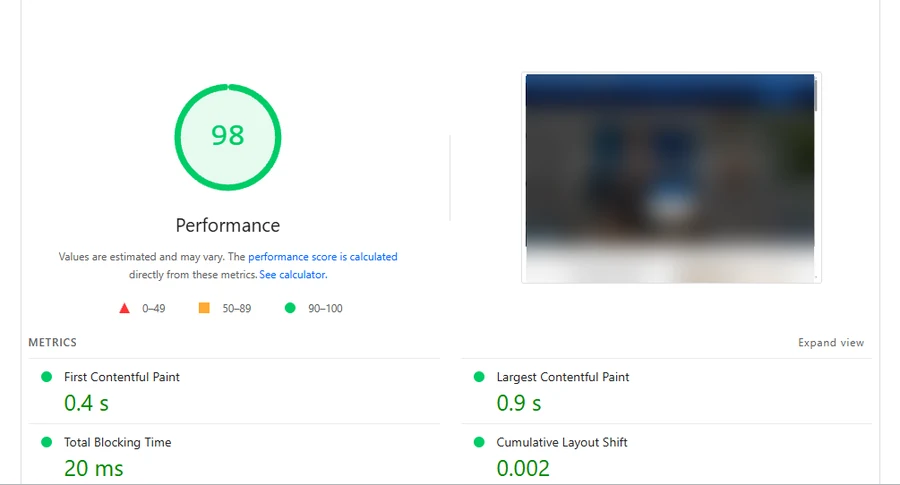
| Desktop | 52 | 98 |
| Active plugins* | 23 | 6 |
*All active plugins. No caching plugin is installed: the scores come from the build itself.
The honest bits
These are lab scores. A single simulated PageSpeed Insights test per device. They move a few points between runs.
The screenshots are desktop. The mobile scores, 37 before and 95 after, are in the table.
Elementor isn’t the villain on its own. It’s what it makes easy: stacking add-ons, sliders and widgets until the site carries far more code than it shows.
Takeaway for practice owners
If editing your own website feels risky, that’s not you. It’s the build. A site should let you change a price or a team photo without worrying what else moves.
FAQ
Questions about this case study
Is Elementor bad for SEO?
Not by itself, but it makes a slow site easy to build. It adds its own layers of HTML, CSS and JavaScript to every page, and add-on packs add more. On this site it also broke regularly and made the backend slow. Rebuilt in native blocks, the same pages went from 37 to 95 on mobile PageSpeed.
Can I still edit my website after moving off Elementor?
Yes, and more easily. Every section is a normal WordPress block, so text, images and buttons are edited where they sit, without a page builder loading on top. The owner, me, or any other developer can make changes.
What does a cumulative layout shift of 0.93 mean?
That the page jumped around a lot while loading, far beyond Google’s 0.1 threshold for a good score. Things like sliders, late-loading fonts and images without set sizes push content down as they appear. After the rebuild, desktop layout shift on this site measures 0.002.
What structured data should a dental practice website have?
At minimum, a Dentist entity with name, address, phone, opening hours and geo coordinates. This site goes further: medical procedure markup on treatment pages, Person markup for the dentists with their qualifications and GDC numbers, FAQPage on four pages, and an offer catalogue with prices.
More rebuilds
Two more, same approach.
Rebuild · WP → WP
97
mobile PageSpeed after the rebuild, up from 47
Hacked through an outdated plugin
Hacked through an outdated paid plugin and slow on mobile. Same site, rebuilt on 8 plugins.
The win: Mobile PageSpeed 47 → 97, and the plugin that let the hackers in is gone for good.
Rebuild · Strapi → WP
98
mobile PageSpeed after the rebuild, up from 94
Fast, but nobody could edit it
A headless Strapi and Next.js site where every change was a developer job. Rebuilt in WordPress on 3 plugins.
The win: Anyone can edit it now, and it still got faster: mobile PageSpeed 94 → 98.